 Readivu
Web articles read aloud, without the page around them
Share a link from your browser to Readivu and it keeps the article itself, leaves the menus, ads and comments out, and reads it to you in a natural voice. Long reads become something you finish on the way home.

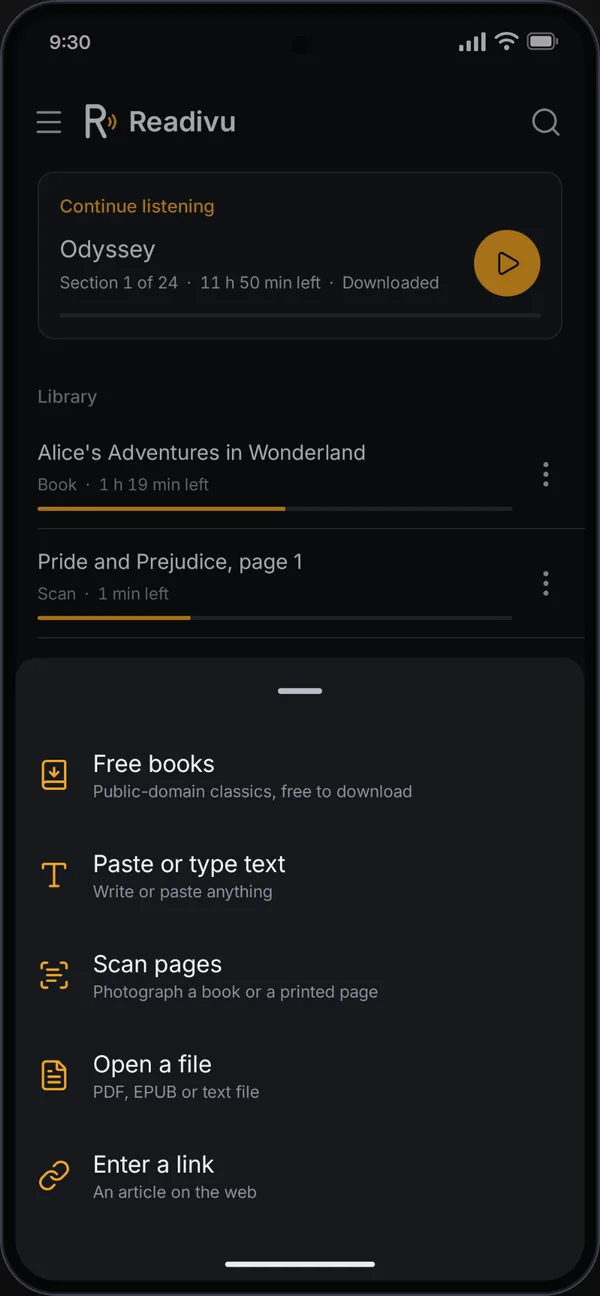
Two ways in
- In Chrome or any browser, tap Share on the article and choose Readivu.
- Or copy the link, open Readivu, tap Add and Enter a link.
- Press play. The article stays in your library, so a long read can wait for the next commute.
Good to know
| Paywalls | Readivu reads what the page shows without a login. An article behind a subscription wall comes through only as far as the free part. |
|---|---|
| Other languages | An article in another language is read with your phone's voice for that language, or translated into English first if you prefer. |
| Anything else you copy | Text you copy in any app can be pasted in, or read straight from the quick settings tile. |
| Privacy | Your phone fetches the page itself. We never see which links you open. |
A habit that sticks
Save articles during the day, listen to them in one go on the commute. Set the speed to 1.5x and a 4,000-word piece takes about 20 minutes. When the article is a PDF report rather than a page, the PDF reader handles it.